Events Section
This content is for v1.0. Switch to the latest version for up-to-date documentation.
Overview
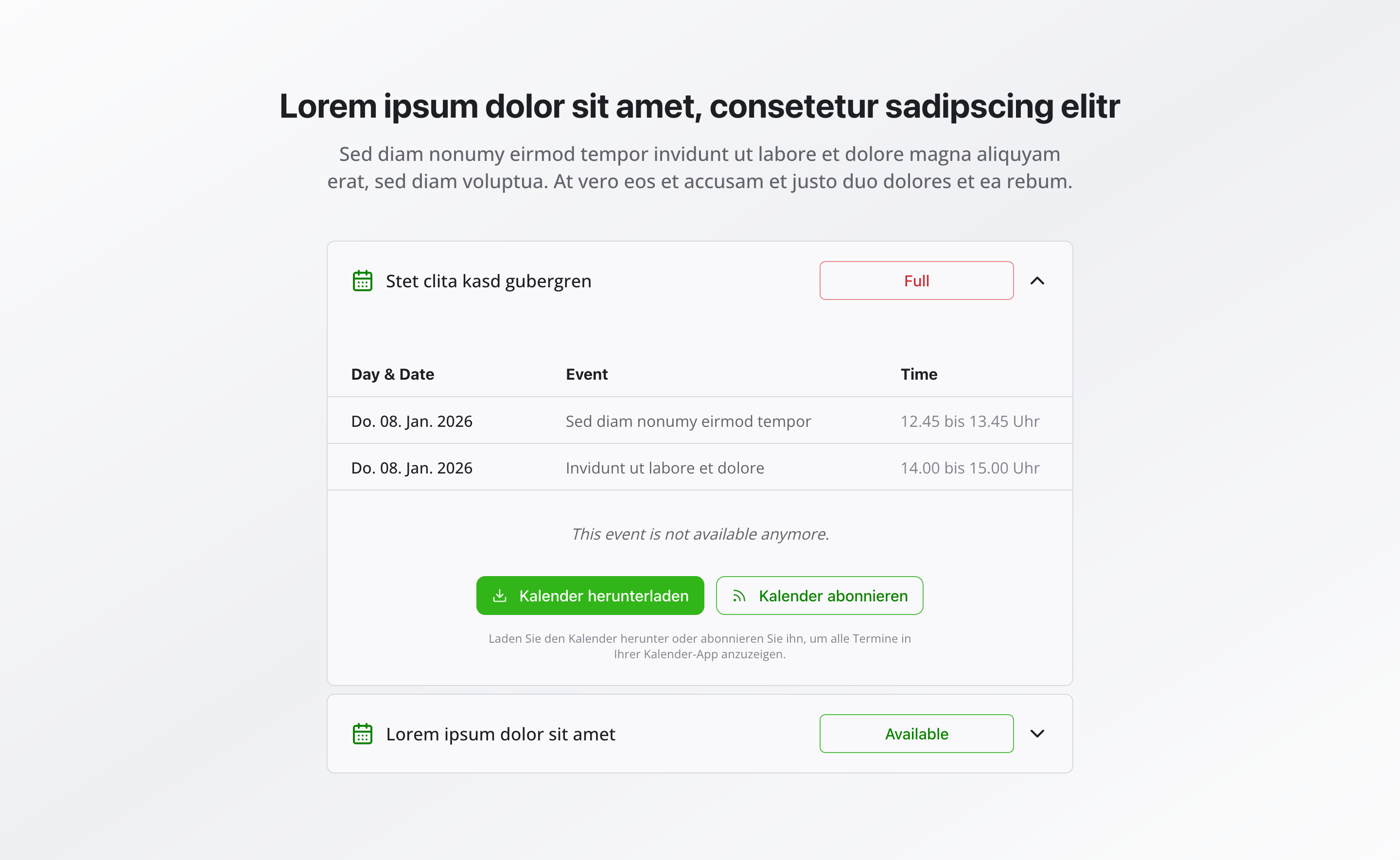
Section titled “Overview”The Events Section presents events from an events list in an organized table format. It’s perfect for displaying courses, appointments, or any scheduled activities with clear date, time, and availability information.
Fields
Section titled “Fields”Active
Section titled “Active”- Type: Boolean
- Required: No
- Default Value:
true - Purpose: Controls whether the events section is displayed on the website
- Note: Turn this off when you want the section hidden temporarily without removing its configuration
Section Headline
Section titled “Section Headline”- Type: String
- Required: No
- Purpose: Main heading for the events section
- Example:
Upcoming EventsorCourse Schedule
Section Description
Section titled “Section Description”- Type: Text
- Required: No
- Rows: 3
- Purpose: Optional description text below the headline
- Example:
Here you'll find all current courses and appointments
Date Column Title
Section titled “Date Column Title”- Type: String
- Required: No
- Purpose: Title for the date column
- Example:
DateorDay & Date
Title Column Title
Section titled “Title Column Title”- Type: String
- Required: No
- Purpose: Title for the session title column
- Example:
CourseorEvent
Time Column Title
Section titled “Time Column Title”- Type: String
- Required: No
- Purpose: Title for the time column
- Example:
TimeorStart Time
Available Status Text
Section titled “Available Status Text”- Type: String
- Required: No
- Purpose: Text to display when spots are available
- Example:
Spots availableorOpen
Full Status Text
Section titled “Full Status Text”- Type: String
- Required: No
- Purpose: Text to display when event is fully booked
- Example:
Fully bookedorSold out
Events List
Section titled “Events List”- Type: Reference (
eventsList) - Required: Yes
- Purpose: Reference to an events list document. The events list document contains an array of events. Each event can have multiple sessions.
Each events list contains:
Events
Section titled “Events”- Type: Array
- Required: No
- Purpose: List of events to display in the events section
Each event in the events array contains:
Enable Event
Section titled “Enable Event”- Type: Boolean
- Required: No
- Purpose: Toggle to show/hide the event
- Default Value:
true
Event Title
Section titled “Event Title”- Type: String
- Required: Yes
- Purpose: Title of the event
Is Full
Section titled “Is Full”- Type: Boolean
- Required: No
- Purpose: Whether this event is fully booked
- Default Value:
false
Custom Full Message
Section titled “Custom Full Message”- Type: Text
- Required: No
- Rows: 3
- Purpose: Custom message to display when the event is full (optional). If left empty, the default message will be used.
- Note: Only visible when “Is Full” is set to
true
Location
Section titled “Location”- Type: Reference (
companyInformation) - Required: No
- Purpose: Location of the event
Event Sessions
Section titled “Event Sessions”- Type: Array
- Required: No
- Purpose: Sessions for this event
Each session in the event sessions array contains:
Session Title
Section titled “Session Title”- Type: String
- Required: Yes
- Purpose: Title of the session
Start Time
Section titled “Start Time”- Type: Datetime
- Required: Yes
- Purpose: Start time of the session
- Date Format: DD.MM.YYYY
- Time Format: HH:mm
- Time Step: 15 minutes
End Time
Section titled “End Time”- Type: Datetime
- Required: Yes
- Purpose: End time of the session
- Date Format: DD.MM.YYYY
- Time Format: HH:mm
- Time Step: 15 minutes
No Events Message
Section titled “No Events Message”- Type: String
- Required: No
- Purpose: Message to display when there are no events
- Example:
Currently no events are scheduled
Background Color
Section titled “Background Color”- Type: Reference (
backgroundColor) - Required: No
- Purpose: Sets the background color for the entire section
Usage Example
Section titled “Usage Example”Typical Configuration
Section titled “Typical Configuration”- Section Headline:
Upcoming Events - Section Description:
Here you'll find all current courses and appointments - Date Column Title:
Date - Title Column Title:
Course - Time Column Title:
Time - Available Status Text:
Spots available - Full Status Text:
Fully booked - Events List: Reference to an
eventsListdocument - No Events Message:
Currently no events are scheduled
Best Practices
Section titled “Best Practices”- Column titles: Use clear, understandable column titles that match your content
- Status texts: Use clear status texts that users can quickly understand
- Regular updates: Keep the events list current with upcoming events
- Empty state: Provide a friendly message when no events are available
- Consistency: Use consistent terminology across all column titles and status texts
- Accessibility: Ensure the table structure is accessible with proper headers
Key Features
Section titled “Key Features”- Table format: Events displayed in a clear, scannable table layout
- Status display: Shows availability status for each event
- Centralized management: Uses events list documents for centralized event management
- Customizable columns: Column titles can be customized to match your needs
- Empty state handling: Friendly message when no events are available
Where It’s Used
Section titled “Where It’s Used”- Pages (
page)
Event pages, course pages, and general content pages
Technical Notes
Section titled “Technical Notes”- Events are fetched from the referenced events list document
- Table structure uses semantic HTML for accessibility
- Background color references the global
backgroundColorschema - Only enabled events are displayed in the table